Hi, can I connect to the target server in the domain using a domain account? I tried and got a refusal and a comment that there was no password assigned to the credentials. The password should be domain-specific because I logged into my segura account using a domain account; the accounts are synchronized with the domain.
Hello,
Have you added the domain credential in PAM and assigned a password to that credential?
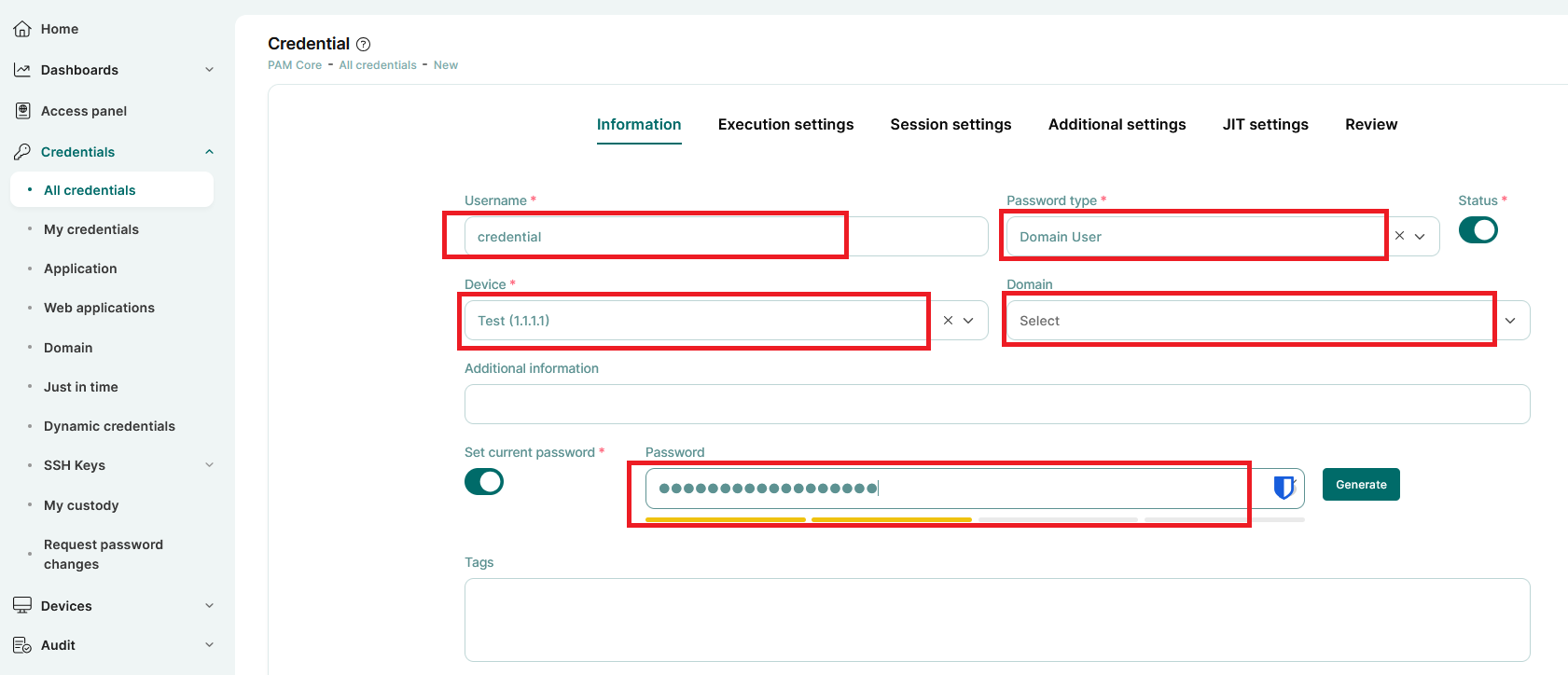
If your domain users are already synchronized with PAM, you need to add the target device to the system first. After that, add the credential in PAM by navigating to:
PAM Core → All Credentials → Credentials → Add (top right corner of the screen).
Make sure the credential is properly linked to the device and that the appropriate access permissions are configured.
Hi,
You cannot log in without providing the password to Segura.
A domain credential is used to log in to the target system as a domain user (in the format DOMAIN\username) for automated access.
Neither Segura nor any other solution can retrieve a user’s password from Active Directory. If any solution were able to do so, it would represent a serious security vulnerability.
When logging in to Segura using domain credentials, you enter your password, and Segura performs an authentication (bind) request against Active Directory. AD then responds with either success or failure. This is the standard authentication process used everywhere when logging in with domain credentials.
That is also why, when you forget a domain user password in Active Directory, you must reset it to a new password rather than view the existing one.
Passwords stored in Active Directory cannot be read or retrieved in plain text under any circumstances.
Best regards,
Hassan
1 Like
I didn’t fill out the “set current password” field because I thought it would be filled in from AD. Should I understand that synchronizing accounts with AD is only for logging in to Segura? Synchronization doesn’t transfer the password from AD to the target server’s credentials? Okay, how can I set credentials for an existing domain account on the target server without knowing the password, because the user won’t provide it for security reasons?
Hello,
Yes technically you are correct, synchronizing accounts with AD is only for logging in to Segura.
Synchronization doesn’t transfer the password from AD to the target server’s credentials.
About knowing the passwords, Segura can discover privileged credentials and manage them using some service account (with relevant privilege ofc), so you don’t have to know account passwords.
To clarify the difference:
Users are the individuals who log in to PAM and use the system. These are real people accessing the PAM portal with their own accounts.
Accounts (or credentials) are the actual IDs and passwords used to access target systems. For example, a Linux root account and its password, or a Windows local/domain administrator account. These accounts are stored and managed in PAM, and users access remote machines through them.
In simple terms, users log in to PAM, and accounts are what PAM uses to log in to remote systems.
Hi,
Here are a few key points to clarify your questions:
- LDAP user provisioning enables synchronization of LDAP users into PAM (e.g., users from a Windows AD domain). This sync allows users to log in to PAM using their domain credentials (username and password).
- This, however, is completely separate from the credentials stored and used to initiate privileged sessions on target devices.
- Credentials used for session initiation are not automatically synced via LDAP provisioning. These must be imported or entered manually, as previously mentioned by others.
Regarding your question about personal credentials (i.e., credentials not stored in the PAM Vault), you can use them, but support is limited to sessions started via RDP or SSH proxies. In this scenario, users manually enter their credentials at the start of each session using the proxy mechanism.
That said, keep in mind that the intended and recommended use of a PAM solution is to manage privileged credentials. The core value of PAM lies in features like credential storage, governance, and password rotation—all of which are bypassed when using personal (non-stored) credentials. This can reduce the overall security and auditability of access.
Hi,
You are correct, AD synchronization is used only for authentication to the PAM platform and is not related to credential management.
Regarding password usage, you have two options:
The first option, and the recommended best practice, is to create dedicated administrative accounts. For example, if the user is “leo,” you would create a separate admin account such as “leo.pam.” The user would log in to PAM using their own domain credentials (leo) and launch sessions using the managed credential (leo.pam) without knowing its password.
This approach allows you to enable password rotation. It aligns with the core objective of PAM, where neither the employee nor even administrators need to know the privileged account password.
The second option is to enable the “use own credential” feature. In this case, users access the target devices using their own domain credentials through RDP or SSH proxies.
I think he can use the Discovery module to discover and add privileged credentials, without knowing credential passwords right?
Thank you for the information, you are extremely professional and competent. I’m running Discovery tonight and will see what happens. Regards.