Disk Space Management for PAM Sessions – From Version 3.33 and 4.0
In versions 3.33 and 4.0, disk space on servers can be easily configured to be automatically managed.
This provides efficiency and high availability, as prolonged PAM usage such as long or frequent sessions can generate huge volumes of data.
Since everything is encrypted, it’s impossible to view the content of the files. However, all file locations are stored inside:
/var/storage/senhasegura/
In most cases, a remote backup is configured (already covered in other articles), but it’s still important to monitor local storage.
Example: Estimating Data Growth
To perform a quick calculation of file usage for December 2025, use the du command:
#du -sch /var/storage/senhasegura/file/pam01_168430124/2025/12*
-M /var/storage/senhasegura/file/pam01_168430124/2025/1203
–M /var/storage/senhasegura/file/pam01_168430124/2025/1204
—K /var/storage/senhasegura/file/pam01_168430124/2025/1205
100G total
That’s approximately 100 GB used in a single month.
Now the next step is to determine the available disk space:
#df -h
Filesystem                 Size  Used Avail Use% Mounted on
udev                       3.9G     0  3.9G   0% /dev
tmpfs                      795M  1.9M  793M   1% /run
/dev/sda1                  4.9G  796M  3.8G  17% /
/dev/mapper/vgss-usr       7.8G  6.3G  1.2G  85% /usr
tmpfs                      3.9G   80K  3.9G   1% /dev/shm
tmpfs                      5.0M     0  5.0M   0% /run/lock
/dev/mapper/vgss-home      2.9G  1.4G  1.4G  50% /home
/dev/mapper/vgss-homeroot  4.9G   67M  4.6G   2% /root
/dev/mapper/vgss-srv        34G   11G   22G  34% /srv
/dev/mapper/vgss-tmp       3.9G   56K  3.7G   1% /tmp
/dev/mapper/vgss-var       147G   44G  103G  30% /var
In the output above, the /var partition has 103 GB available. Another month of usage (around 100 GB) could lead to the disk reaching full capacity and causing an incident.
To prevent this, activate the Session Purge option in the PAM application settings.
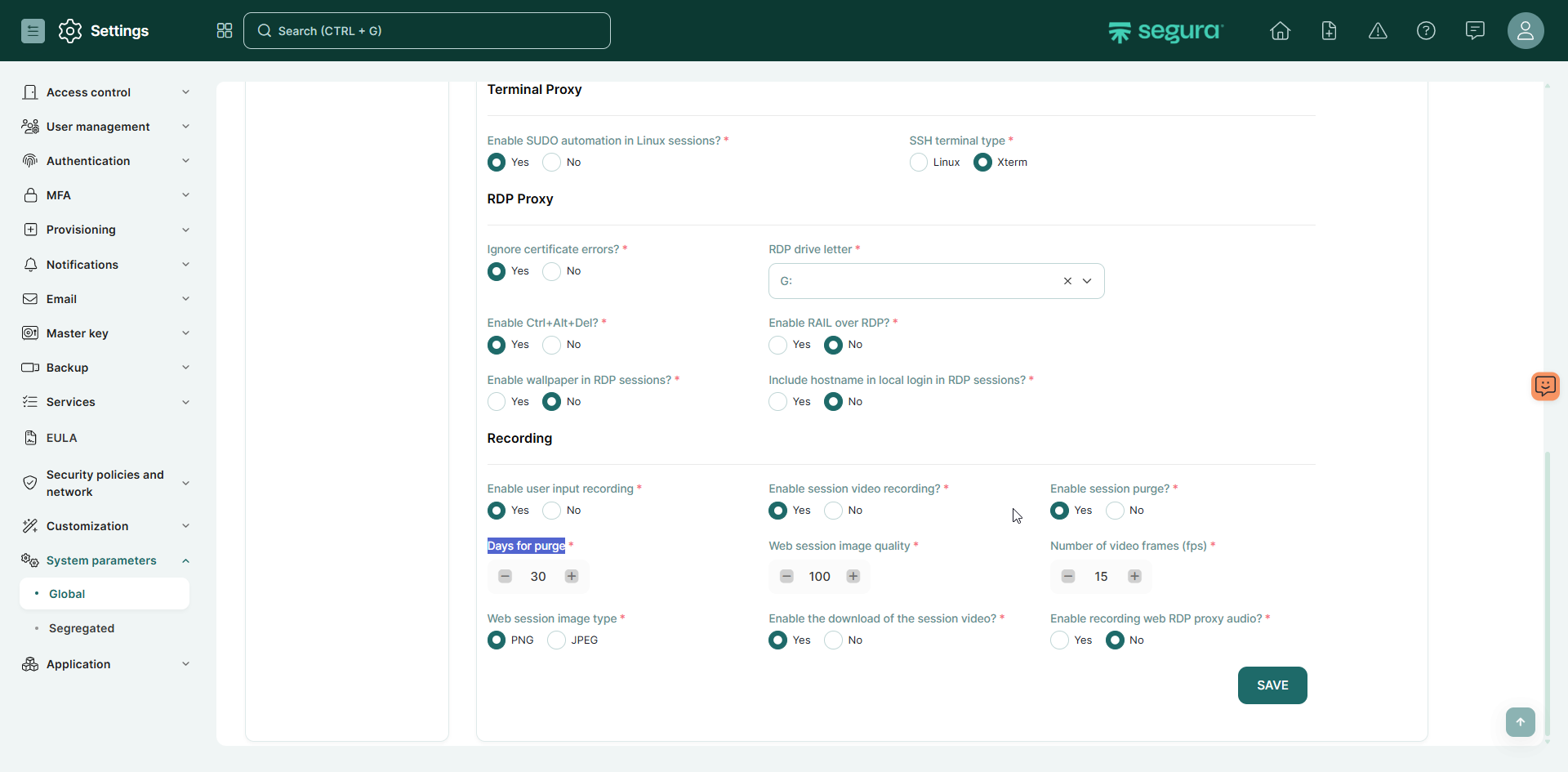
Session purge must be set to yes, and the “Days for purge” should be configured to match a period of time that can allocate the whole amount of session use before the next purge!
Set:
Session Purge = Yes
Days for Purge = A value that fits your available disk space
Sizing options example:
For an average usage of 100 GB/month, like in the example shown on this article:
- A 30-day purge setting would require at least a 300 GB /var partition;
- This would leave around 30% of the disk space in use;
- This also provides room to increase the retention period later (for example, to 60 days).