Segura is one of the few PAM solutions that includes native database proxies, making it a unique, competitive, and strategic component of the Vault experience. One of the most commonly used is the SQL Server Proxy — officially named proxy-db-mssql.
Starting with version 4.0, the following best practices MUST be followed to ensure optimal performance and user experience:
- If you are using SSMS (SQL Server Management Studio), make sure your version is 20 or higher to ensure compatibility and performance;
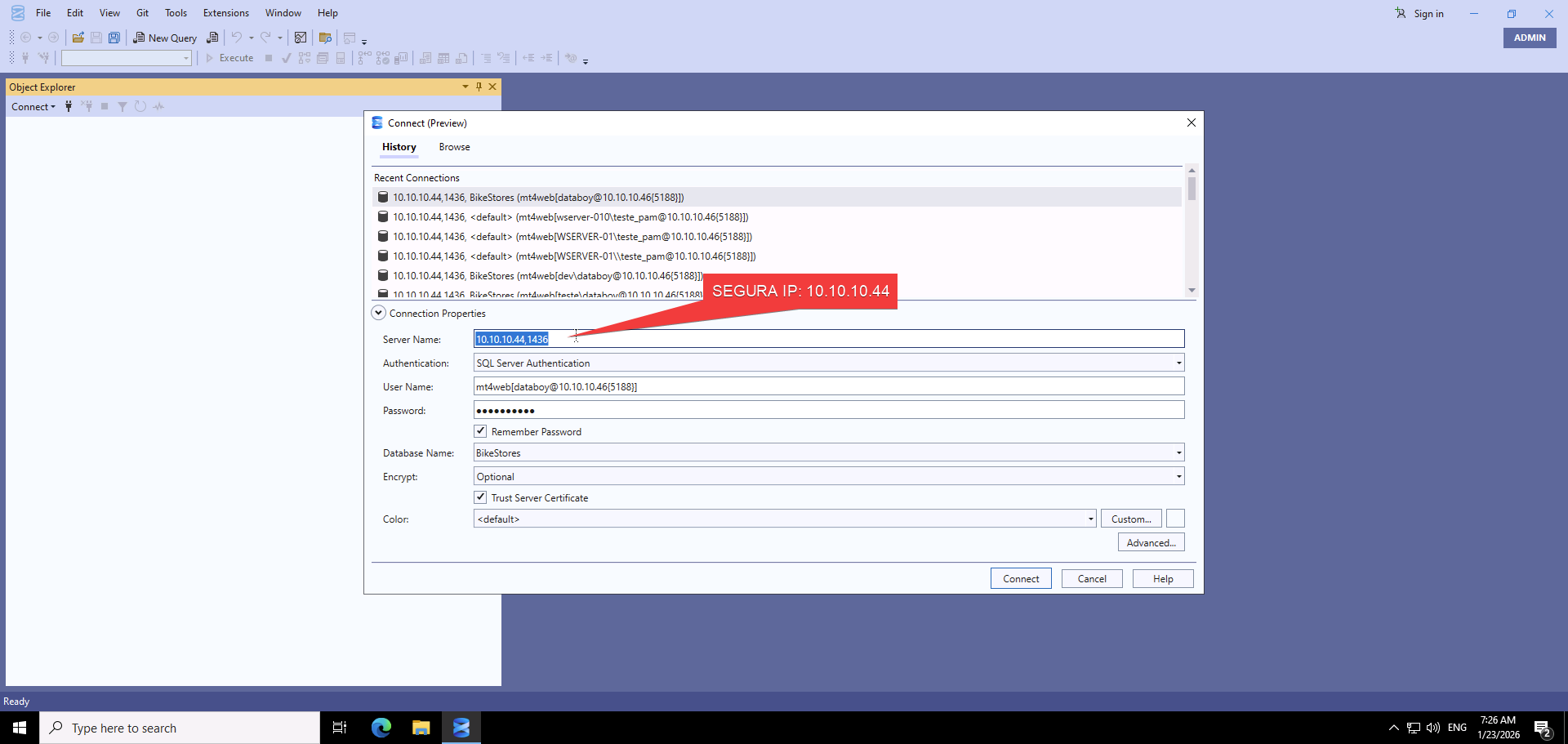
- When using SSMS version 20 or above, you must connect to the proxy using port 1436 — this is critical for proper communication;
- Port 1436 is a custom port specifically designed to enhance the experience with SSMS and should ALWAYS be used when connecting from SSMS;
- For other SQL clients (like DBeaver), the standard 1433 port should be used instead;
- Always close SSMS after completing your activities through the Segura proxy to ensure proper session handling and resource release.
To connect via port 1436 in SSMS, use the following format in the “Server Name” field:
See image below for referrence:
Following these guidelines will help prevent connection issues, authentication problems, and improve overall session responsiveness.