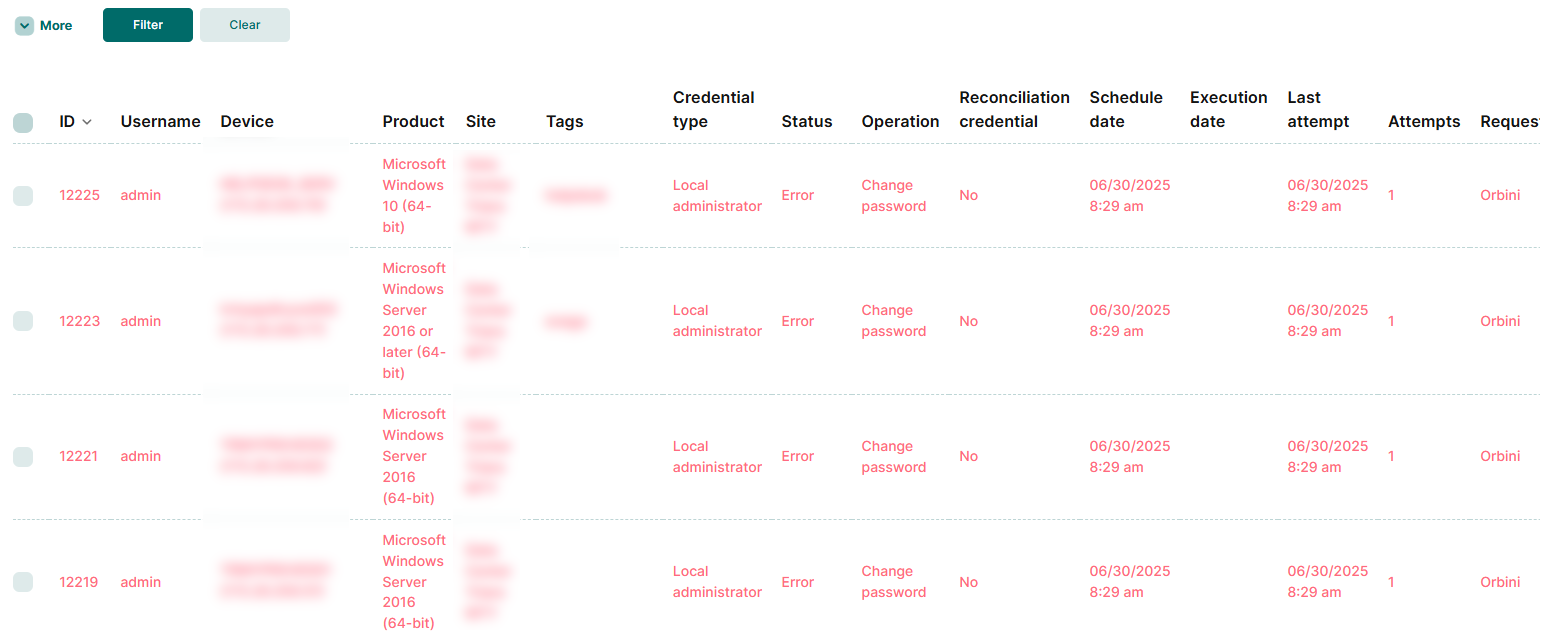
We have obtained multiple “password change” records.
Fortunately these attempts have failed.
The problem is that it has occurred on multiple devices in a short period of time.
According to the “username” field it looks like they were made by our admin, plus the “Orbini” request seems to indicate that it is due to a scheduled task.
Here I have 2 questions.
In 4.0 where can I see the scheduled tasks, done or waiting to be done and details?
Is it possible to get a log showing who and when created this task?
We want to rule out that this is due to an error and not even unauthorized access to our admin user.
You can check the logs directly from the same screen you are using. For more details, we recommend also consulting the Password Change Dashboard, which offers a more complete view of all activities related to credential changes.
Some important notes:
The “Username” field refers to the credential that is being rotated, and not to the user who made the request.
The “Requester” field indicates who made the change request. When it displays “Orbini”, it means that the request was made automatically by the system, based on the policies configured in the environment.
This behavior is expected when there are scheduled tasks in the system. Therefore, changes occur automatically, without manual intervention by a user.
We are available to help you with whatever you need!